PE parsing
Mar 27, 2025A random page with some information of the PE format file and its main headers. Main usage: malware development and malware research.
Considerations
- RVA (Relative Virtual Address): Offset from Image Base. To obtain the absolute virtual address the calculation “Image Base + RVA” must be performed. Several PE sections include RVAs.
- Check the official Microsoft documentation if you want to know more! This is only a summary and my personal studies about the topic.
DOS header
IMAGE_DOS_HEADERstructure definition fromwinnt.h.- First 64 bytes of the PE file.
- Was very important in the MS-DOS era, right now it is not.
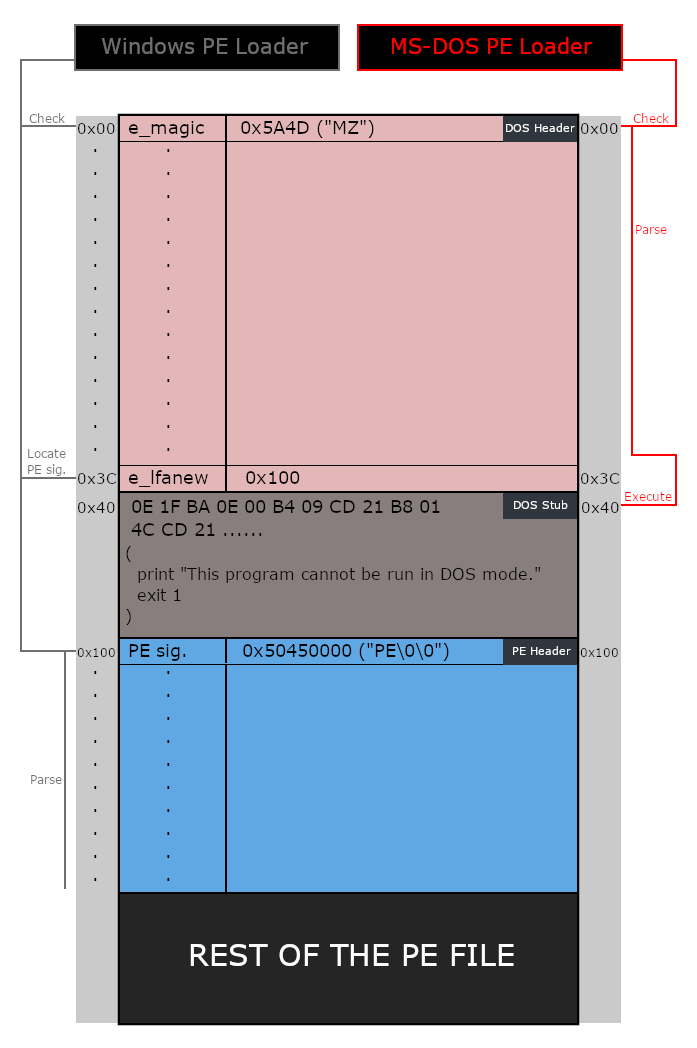
- The actual Windows OS loader uses a field in this header to navigate to the new executable header , which is the header containing most of the needed information.
- Kept in the binaries for compatibility purposes.
We only want to know about the first and last members of this header:
e_magic: First member of the DOS Header, it’s a WORD (2 bytes), and it’s a called a magic number. It has a fixed value of0x5A4DorMZin ASCII, and it serves as a signature that marks the file as an MS-DOS executable.e_lfanew: This is the last member of the DOS header. This member is important to the PE loader on Windows systems because it tells the loader where to look for the new executable header. It is basically an “offset” pointer to the new executable header (from now on, called PE header).
This is what the old MS-DOS loader and the new Windows PE Loader do with this header:
DOS stub
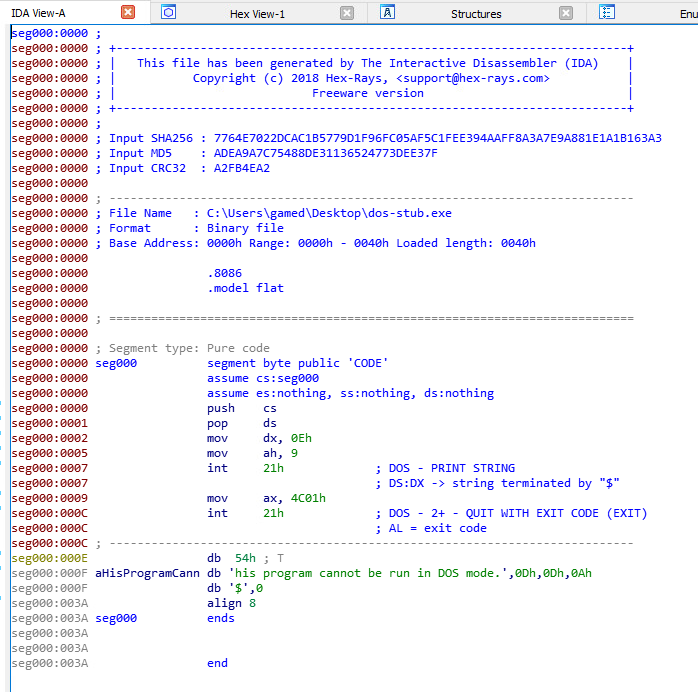
The DOS stub is a MS-DOS program that prints an error message saying that the executable is not compatible with DOS, and exists. This is not executed in the modern Windows OS. This is what gets executed when the program is loaded in MS-DOS. If we copy the bytes of the DOS stub into IDA or any disassembler, we can see that the code routine is just to print the string and exit.
NT header (PE header/new executable header)
IMAGE_NT_HEADERSas defined in winnt.h.
| |
There is one structure for 32-bit executables and other for 64-bit executables. The optional header differs, as can be seen in the struct.
Signature
Fixed value of 0x50450000 which translates to PE\0\0 in ASCII. Again, another magic number inside the executable. This is used by the loader to know that it has reached the correct section after querying e_lfanew from the DOS header.
File Header
Check the official microsoft docs for this struct here . Another struct that contains information about the PE file. Some of this information is relevant. Let’s see the struct:
| |
Details about the header:
Machine: Target architecture of the executable. Normally, these values0x8864forAMD64and0x14cfori386are the common ones. However, for a complete list of possible values you can check the official Microsoft documentation . However, this value is often ignored by theMagicvalue in the Optional Header (we will see it later).NumberOfSections: Number of sections that the binary has (.data is a section, for example).TimeDateStamp: The unix timestamp that indicates when the file was created.PointerToSymbolTable: The offset of the symbol table, in bytes, or zero if no COFF symbol table exists. Normally set to zero as the table does not get included by the compiler.NumberOfSymbols: Number of symbols in the COFF symbol table (normally 0).SizeOfOptionalHeader: The size of the optional header in bytes (we will see that header later).Characteristics: A flag that indicates the attributes of the file, these attributes can be things like the file being executable, the file being a system file and not a user program, and a lot of other things. A complete list of these flags can be found on the official Microsoft documentation .
Optional Header
This can be very confusing, but this header, called the optional header, is one of the most important headers in the PE.
The PE loader looks for specific information from this header in order to load and run the executable.
It’s called optional header as this header is not included in object files, but it is included in image files, as executables.
It doesn’t have a fixed size, that’s why the IMAGE_FILE_HEADER.SizeOfOptionalHeader member exists.
As mentioned earlier, there are two versions of the Optional Header, one for 32-bit executables and one for 64-bit executables.
The two versions are different in two aspects:
- The size of the structure itself (or the number of members defined within the structure):
IMAGE_OPTIONAL_HEADER32has 31 members whileIMAGE_OPTIONAL_HEADER64only has 30 members, that additional member in the 32-bit version is a DWORD namedBaseOfDatawhich holds an RVA of the beginning of thedatasection. - The data type of some of the members: The following 5 members of the Optional Header structure are defined as
DWORDin the 32-bit version and asULONGLONGin the 64-bit version:ImageBaseSizeOfStackReserveSizeOfStackCommitSizeOfHeapReserveSizeOfHeapCommit
We will focus in the 64 bit struct, as most of the malware we will create and parse will be of this type:
| |
Let’s talk about the elements (information gathered from the Official Microsoft docs ):
Magic: The optional header magic number determines whether an image is a PE32 or PE32+ executable. The value of this field is what determines whether the executable is 32-bit or 64-bit,IMAGE_FILE_HEADER.Machineis ignored by the Windows PE loader:0x10B: Identifies the image as aPE32executable.0x20B: Identifies the image as aPE32+executable.0x107: Identifies it as a ROM image.
MajorLinkerVersionandMinorLinkerVersion: The linker major and minor version numbers.SizeOfCode: This field holds the size of the code (.text) section, or the sum of all code sections if there are multiple sections.SizeOfInitializedData: This field holds the size of the initialized data (.data) section, or the sum of all initialized data sections if there are multiple sections.SizeOfUninitializedData: This field holds the size of the uninitialized data (.bss) section, or the sum of all uninitialized data sections if there are multiple sections.AddressOfEntryPoint: An RVA of the entry point when the file is loaded into memory. For program images, this is the starting address. For device drivers, this is the address of the initialization function. An entry point is optional for DLLs. When no entry point is present, this field must be zero.BaseOfCode: An RVA of the start of the code section when the file is loaded into memory.ImageBase: This field holds the preferred address of the first byte of image when loaded into memory (the preferred base address), this value must be a multiple of 64K.- Due to memory protections like ASLR, and a lot of other reasons, the address specified by this field is almost never used. In such case, the PE loader chooses an unused memory range to load the image into, loads the image in such address, and starts the relocation process.
- In the relocation process, the OS fixes the constant addresses within the PE to work with the new image base.
- There’s a special section that holds information about places that will need fixing if relocation is needed, that section is called the relocation section (
.reloc).
SectionAlignment: The alignment (in bytes) of sections when they are loaded into memory. It must be greater than or equal to FileAlignment. The default is the page size for the architecture.FileAlignment: Similar toSectionAligmentthis field holds a value that gets used for section raw data alignment on disk (in bytes), if the size of the actual data in a section is less than theFileAlignmentvalue, the rest of the chunk gets padded with zeroes to keep the alignment boundaries. The documentation states that this value should be a power of 2 between 512 and 64K, and if the value ofSectionAlignmentis less than the architecture’s page size then the sizes ofFileAlignmentandSectionAlignmentmust match.MajorOperatingSystemVersion,MinorOperatingSystemVersion,MajorImageVersion,MinorImageVersion,MajorSubsystemVersionandMinorSubsystemVersion: These members of the structure specify the major version number of the required operating system, the minor version number of the required operating system, the major version number of the image, the minor version number of the image, the major version number of the subsystem and the minor version number of the subsystem respectively.Win32VersionValue: A reserved field that the documentation says should be set to0.SizeOfImage:The size of the image file (in bytes), including all headers. It gets rounded up to a multiple ofSectionAlignmentbecause this value is used when loading the image into memory.SizeOfHeaders: The combined size of the DOS stub, PE header (NT Headers), and section headers rounded up to a multiple ofFileAlignment.CheckSum: A checksum of the image file, it’s used to validate the image at load time.Subsystem: This field specifies the Windows subsystem (if any) that is required to run the image, A complete list of the possible values of this field can be found on the official Microsoft documentation .DLLCharacteristics: This field defines some characteristics of the executable image file, like if it’sNXcompatible and if it can be relocated at run time.- Although it is called
DLLCharacteristics, it exists within normal executable image files and it defines characteristics that can apply to normal executable files. Don’t get confused by the name. A complete list of the possible flags forDLLCharacteristicscan be found on the official Microsoft documentation .
- Although it is called
SizeOfStackReserve,SizeOfStackCommit,SizeOfHeapReserveandSizeOfHeapCommit: These fields specify the size of the stack to reserve, the size of the stack to commit, the size of the local heap space to reserve and the size of the local heap space to commit respectively.LoaderFlags: A reserved field that the documentation says should be set to0.NumberOfRvaAndSizes: Size of theDataDirectoryarray.DataDirectory: An array ofIMAGE_DATA_DIRECTORYstructures. This is the interesting section of the optional header.
Data Directory
The optional header field has an array of IMAGE_DATA_DIRECTORY called DataDirectory, with a maximum size of 16 entries (specifed by the constant IMAGE_NUMBEROF_DIRECTORY_ENTRIES):
| |
An IMAGE_DATA_DIRETORY structure is defines as follows:
| |
It’s a very simple structure with only two members, first one being an RVA pointing to the start of that Data Directory and the second one being the size of that Data Directory.
But, what is a Data Directory?
A Data Directory is a piece of data located within one of the sections of the PE file.
Data Directories contain useful information needed by the Windows loader.
An example of a very important directory is the Import Directory, a data directory that contains the list of external functions imported from other libraries.
Here’s a list of Data Directories defined in winnt.h. (Each one of these values represents an index in the DataDirectory array):
| |
So, for example, to access the Import Directory information we will have to:
- Parse the DOS header.
- Get the e_lfanew variable of the DOS header to get the offset to the PE header.
- Navigate to the optional header.
- Get to the offset where the Data Directory array is.
- Get the position 1 of such array.
We will obtain a struct containing the RVA and the size of such Data Directory. With that information, we can access such directory and parse it. Note that each directory will be parsed differently, depending on the information that it contains.
Also note that there can be data directories with no information. If we take a look at the contents of IMAGE_OPTIONAL_HEADER.DataDirectory of an actual PE file, we might see entries where both fields are set to 0:
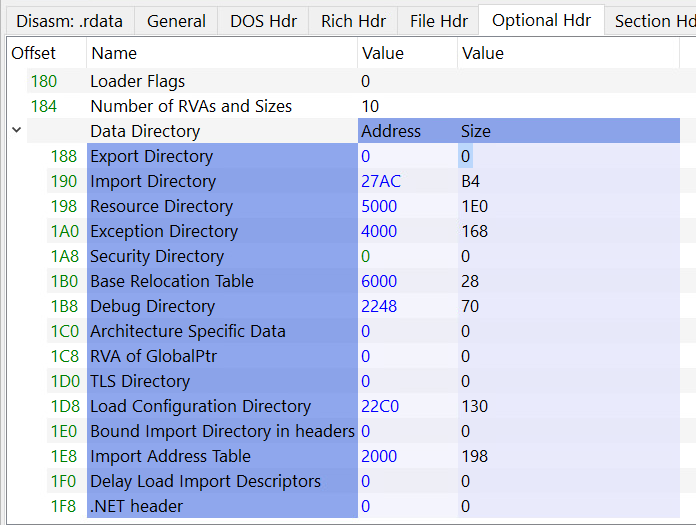
Important: Data directories can be inside the sections (e.g, the Import Directory Table is usually inside the .idata or .rdata section). So, we can say that after the NT header, there are the section headers.dI
Section headers
After the PE header, the section headers are the following. They are the last headers in the PE.
A Section Header is a structure named IMAGE_SECTION_HEADER defined in winnt.h as follows:
| |
There will be one section header for each of the sections in the PE. Remember that we can retrieve the name of the sections:
| |
These are the fields of a section header:
Name: A byte array of the sizeIMAGE_SIZEOF_SHORT_NAMEthat holds the name of the section.IMAGE_SIZEOF_SHORT_NAMEhas the value of8meaning that a section name can’t be longer than 8 characters.- For longer names the official documentation mentions a work-around by filling this field with an offset in the string table, however executable images do not use a string table so this limitation of 8 characters holds for executable images.
PhysicalAddressorVirtualSize: Aunionvariable defines multiple names for the same thing. This field contains the total size of the section when it’s loaded in memory.VirtualAddress: The documentation states that for executable images this field holds the address of the first byte of the section relative to the image base when loaded in memory, and for object files it holds the address of the first byte of the section before relocation is applied.SizeOfRawData: This field contains the size of the section on disk, it must be a multiple ofIMAGE_OPTIONAL_HEADER.FileAlignment. Note that this is the size ondisk, whereasPhysicalAddressorVirtualSizespecifies the size once it’s loaded in memory (the size can differ).PointerToRawData: A pointer to the first page of the section within the file, for executable images it must be a multiple ofIMAGE_OPTIONAL_HEADER.FileAlignment.PointerToRelocations: A file pointer to the beginning of relocation entries for the section. It’s set to0for executable files.PointerToLineNumbers: A file pointer to the beginning of COFF line-number entries for the section. It’s normally set to0because COFF debugging information is deprecated.NumberOfRelocations: The number of relocation entries for the section, it’s normally set to0for executable images.NumberOfLinenumbers: The number of COFF line-number entries for the section, it’s set to0because COFF debugging information is deprecated.Characteristics: Flags that describe the characteristics of the section.- These characteristics are things like if the section contains executable code, contains initialized/uninitialized data, can be shared in memory.
- A complete list of section characteristics flags can be found on the official Microsoft documentation .
Raw Data can != Virtual size
SizeOfRawData and VirtualSize can be different, and this can happen for multiple of reasons.
SizeOfRawData (the size on disk) must be a multiple of IMAGE_OPTIONAL_HEADER.FileAlignment.
If the raw data size is less than that such value, the rest gets padded to match a multiple of the alignment.
However, when the section is loaded into memory it doesn’t follow that alignment and only the actual size of the section is occupied. In this case SizeOfRawData will be greater than VirtualSize.
The opposite can happen as well.
If the section contains uninitialized data, these data won’t be accounted for on disk, but when the section gets mapped into memory, the section will expand to reserve memory space for when the uninitialized data gets later initialized and used.
This means that the section on disk will occupy less than it will do in memory, in this case VirtualSize will be greater than SizeOfRawData.
Sections
Lastly, the PE has the contents of the sections (.text, .data, .rdata). Some sections have special names that indicate their purpose, we’ll go over some of them, and a full list of these names can be found on the official Microsoft documentation under the “Special Sections” section.
.text: Contains the executable code of the program..data: Contains the initialized data..bss: Contains uninitialized data..rdata: Contains read-only initialized data..edata: Contains the export tables..idata: Contains the import tables..reloc: Contains image relocation information..rsrc: Contains resources used by the program, these include images, icons or even embedded binaries..tls: (Thread Local Storage), provides storage for every executing thread of the program.
Import table
There is no rule that says that the import table must begin at the start of a section named .idata, but that’s how it is typically done, for reasons both traditional and practical.
The first field of the import table, VirtualAddress, is actually the RVA of the table. The RVA is the address of the table relative to the base address of the image when the table is loaded. The second field gives the size in bytes. The data directories, which form the last part of the optional header, are listed in the following table.
Note that the number of directories is not fixed. Before looking for a specific directory, check the NumberOfRvaAndSizes field in the optional header.
Also, do not assume that the RVAs in this table point to the beginning of a section or that the sections that contain specific tables have specific names.

 If we navigate to the Section headers, we will see that the .rdata section will start before 2DC0C8:

But we can see that the import directory is not at the start of the section, but somewhere in the middle, as the .rdata section starts a bit before (0x26000) whereas the import directory starts at 0x2D0C8. The tool just says that the Import Directory is inside .rdata, but not at the start of it.
We need to translate the Import Directory RVA to the file offset - a place in the binary file where the DLL import information is stored. The way this can be achieved is by using the following formula:
Location of the Import Directory = imageBase + section.RawOffset + (importDirectory.RVA − section.VA)
Where:
imageBaseis the start address of where the binary image is loadedsection.RawOffsetis theRaw Addressvalue from the.textsectiontext.VAisVirtual Addressvalue from the.textsectionimportDirectory.RVAis theImport Directory RVAvalue fromData DirectoriesinOptional Header.
Let’s think how to obtain all the values:
imageBasein our case is 0 since the file is not loaded to memory and we are inspecting it on the disk.- Import table is located in a specific section of the binary. Since the binary is not loaded to disk, we need to know the file offset of the section that the import directory is in relation to the
imageBase. imageBase + text.RawOffsetgives us the file offset to the.textsection - we need it, because remember - the import table is inside the.textsection- Since
importDirectory.RVA, as mentioned earlier, lives in a section,importDirectory.RVA - text.VAgives us the offset of the import table relative to the start of the.textsection - We take the value of
importDirectory.RVA - text.VAand add it to thetext.RawOffsetand we get the offset of the import table in the raw section data. After that, we can start parsing the Import Directory.
It consists of an array of IMAGE_IMPORT_DESCRIPTOR structures, each one of them is for a DLL.
It doesn’t have a fixed size, so the last IMAGE_IMPORT_DESCRIPTOR of the array is zeroed-out (NULL-Padded) to indicate the end of the Import Directory Table.
IMAGE_IMPORT_DESCRIPTOR is defined as follows:
| |
Get DLL name
We need to get the Name RVA (name does not point to the name, but contains a RVA) to a file offset using the technique we used earlier to get the location of the DLL name string.
This time the formula we need to use is:
| |
Where nameRVA is Name RVA value for ADVAPI32.dll from the Import Directory and text.VA is the Virtual Address of the .text section.
Get DLL Import Address Table (imported functions)
TBD